
Based on the code from Makis, SV1AFN I have created a small library to access the AD7887 ADC converter. The library is pretty simple to use.
#include <AD7887.h>

//=================================================================
#define SELPIN 10   //Selection Pin
#define DATAOUT 9   //MOSI
#define DATAIN  8   //MISO
#define SPICLOCK 7 //Clock
AD7887 powerSensor = AD7887(SELPIN, DATAOUT, DATAIN, SPICLOCK);

void loop( void ) {
   uint16_t actualValue = powerSensor.readADC();

   // Do whatever you like with the data
}
You can find the library on GITHUB. Place all files in a newly created folder named "AD7887" in the library folder of your Arduino installation. Usually the "libraries" folder in your sketch folder. If you install the library correctly it will appear under the SENSOR section in the Arduino IDE library manager.
Here you can see some time diagrams:
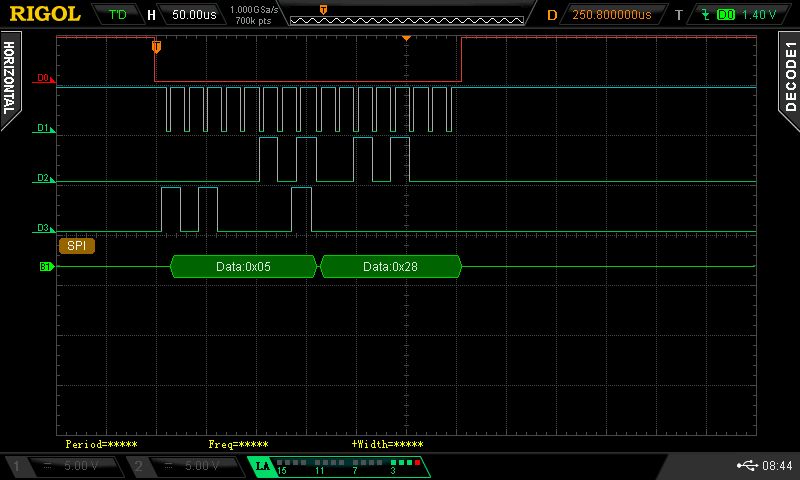
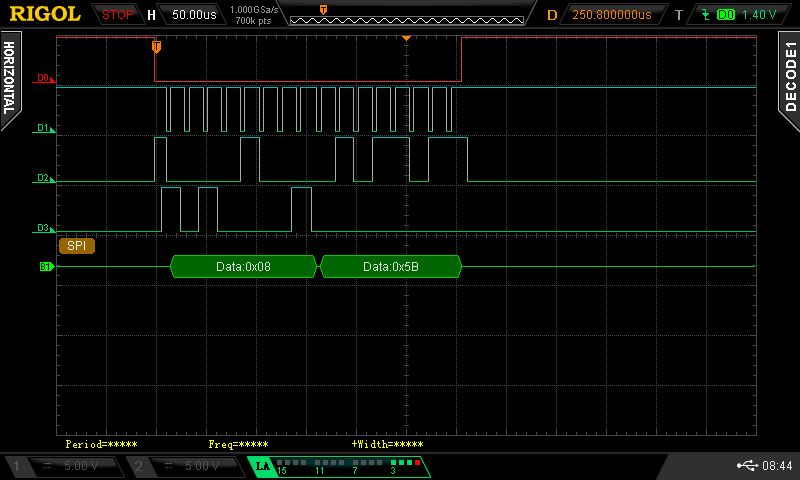
I've used the SPI decoding function of my Rigol MSO2072A - this works pretty good!
D0 == /ChipSelect
D1 == SerialClock
D2 == Data from AD7887
D3 == Data to AD7887
As you can see, the speed is not so good. The library is using the standard Arduino implemenation of digitalWrite() command - they are horrible slow ...
If you have questions, feel free to contact me by